Using Notion to Run an Agency

Aeryk Payne

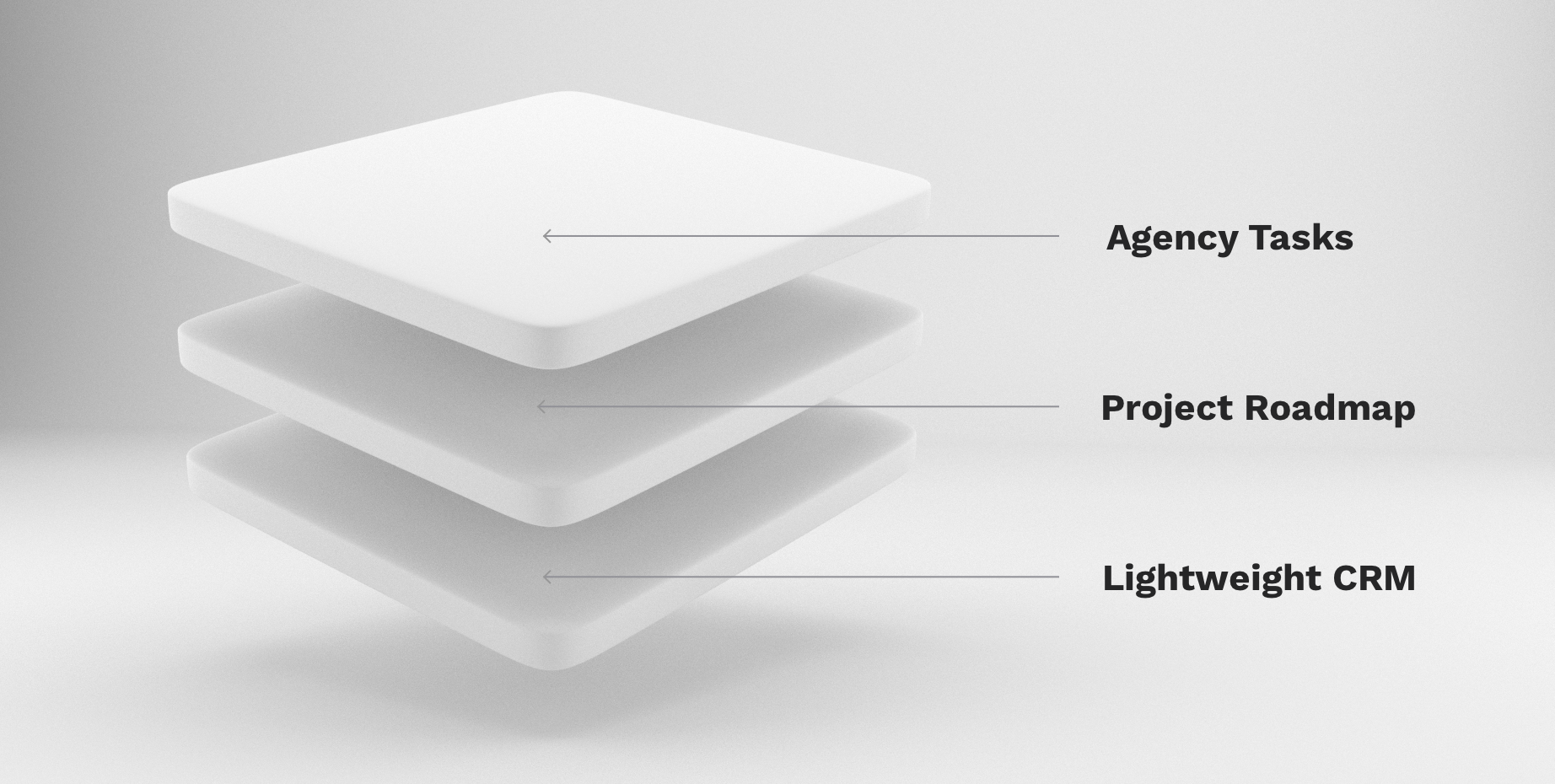
The three tables you need to run an agency.

At Nicer we’ve used Notion to help wrangle projects and track our internal and client work. We’ve even found ourselves helping partners and clients get set up and using Notion with their teams. Throughout this process, we’ve developed a structured pattern of connected databases that work for us, and we thought we’d share that setup as a template for everyone. Hopefully, this helps spark some ideas, conversations, or merely ease the daunting nature that can be a brand new notion workspace.

TLDR; here’s the Notion Template.

Primary Tables

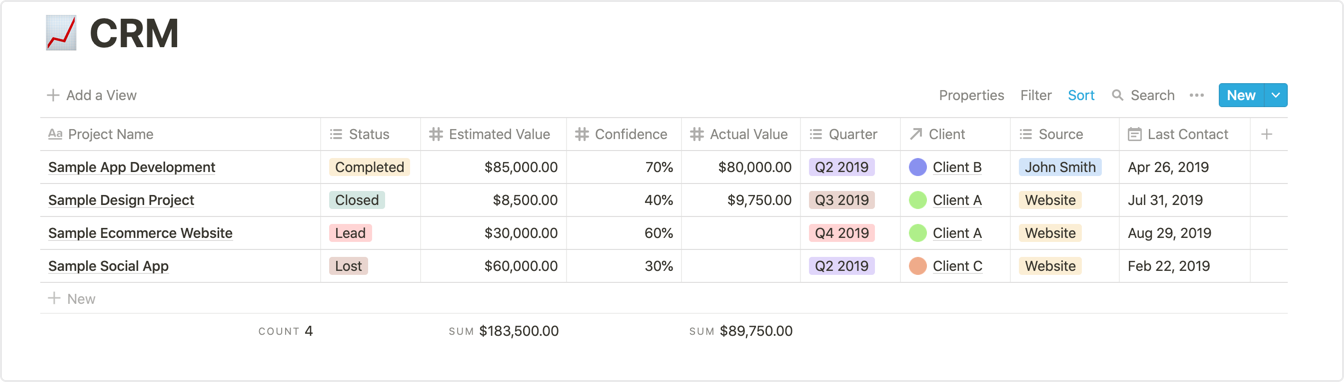
01. The Base: CRM
If you think about the life of a typical project, it starts as a lead. Perhaps it’s an RFP or a friendly Referral. Your first step is to create a new entry in the CRM table (ours is based on the Lightweight CRM Template from Notion, with a few key changes to fit our needs).
02. The Middle: Projects
Once a project closes, we’ll add an entry to the projects database and relate it to the corresponding entry on CRM. The project page is where we add high-level, relevant project details. This page will vary based on your workflow, but for us, it typically looks like a collection of Dropbox links to the root folder, the Scope of Work, and the occasional Figma embed.
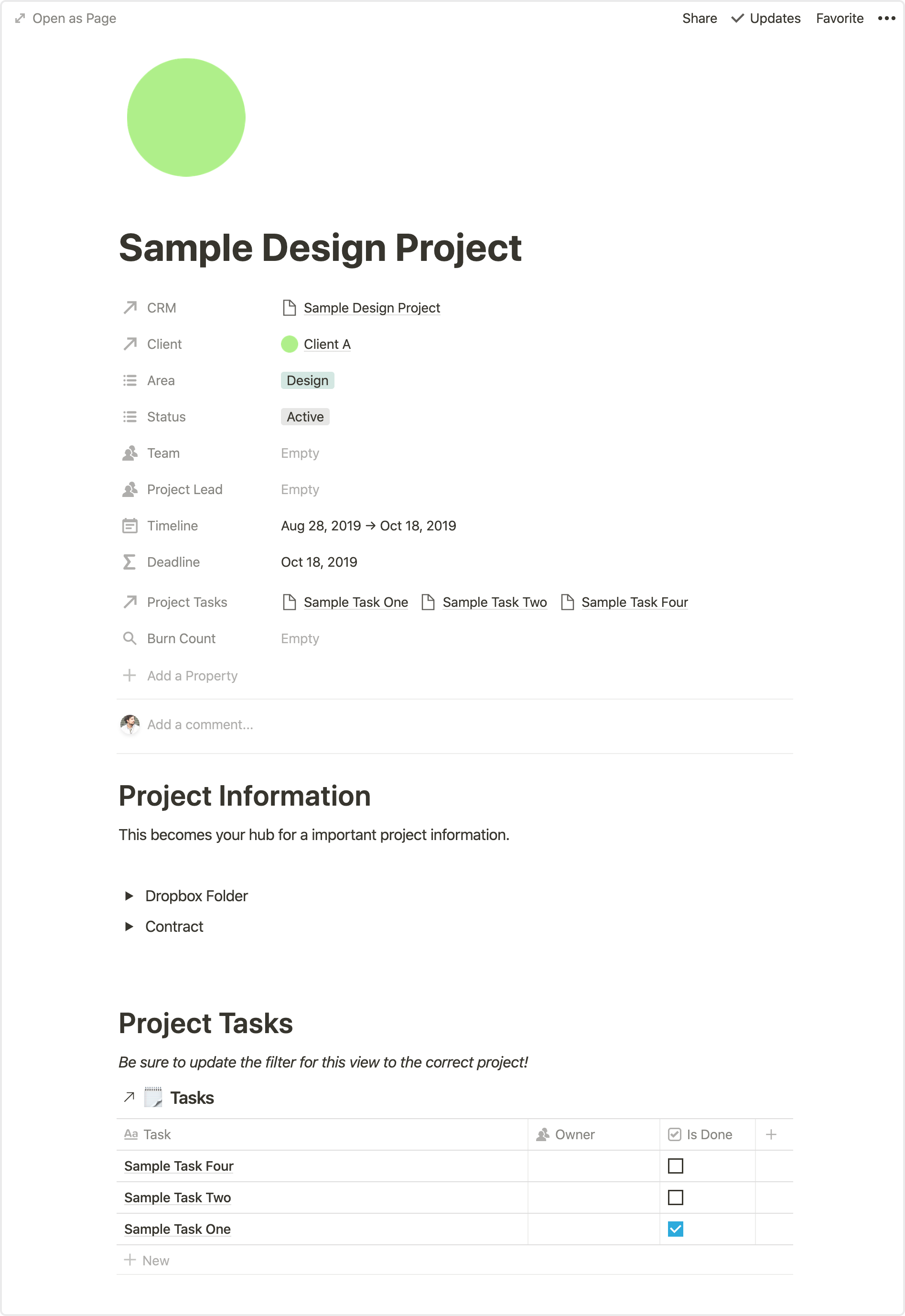
Sample Project Entry

03. The Top: Tasks
Here is where things may get a little overwhelming at first, but bear with us. We use a third table for all tasks. Here you add every task across your entire agency, and then assign essentials, such as owner, project, client, due date, etc. By keeping all the tasks in a central table, we can pull in filtered instances of this table anywhere we’d like. One example of this is on individual project pages we often embed an instance of the tasks table and filter by that specific project.

Additional Tables

These are two tables, that while not essential to the above workflow, we’ve found to be incredibly helpful as reference tables.

04. Clients
Every Project entry gets a relation to a Client (if the client doesn’t exist yet, you can easily add the entry from the project page). The client database becomes a collection of valuable relations that, through some filtered views, can provide helpful insights for your business.
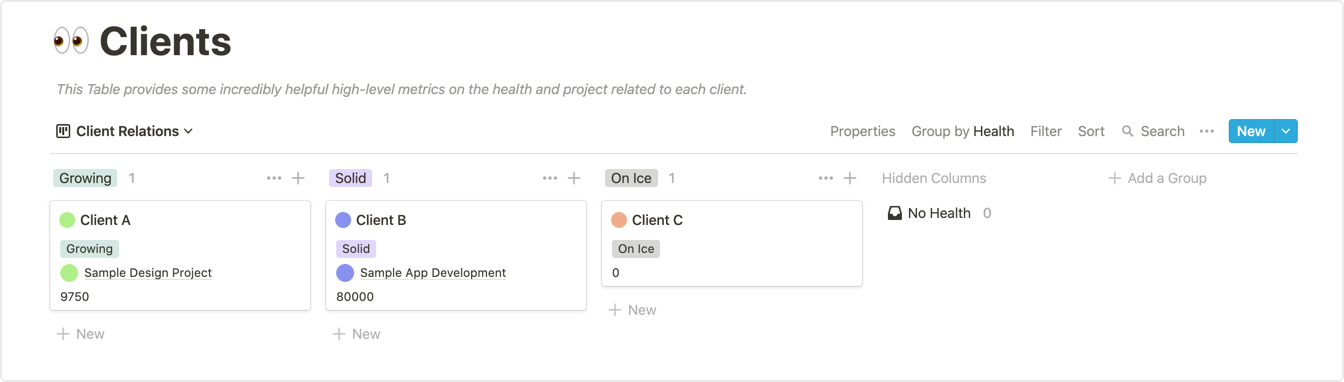
Gain helpful insights such as total revenue per client.

05. Homebase
This page is technically unnecessary (a highly filtered view of tasks will get you the same result), but we’ve found it to be beneficial, especially to folks less familiar with Notion. Pulling a page from Basecamp, our Homebase is simply a filtered view of tasking showing each person what’s on their plate for the week. (This also functions as an easy place to add quick tasks as they pop-up throughout the week.)
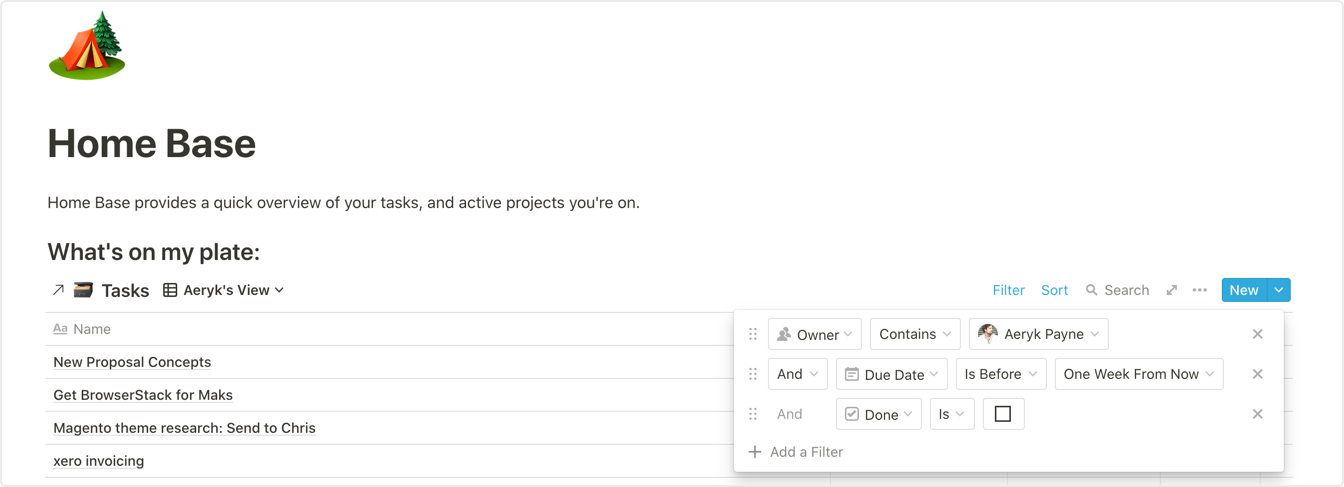
Homebase View

Would love to hear any questions or feedback you have, or how you’ve been using Notion with your team!

Full Notion Template: https://www.notion.so/nicer/Notion-Agency-Template-4f94c7dd65c94a9988dc175abb35f19e

Canonical — this post lives on Medium
Read the original on medium.com

Like what you're seeing? Let's talk.

Available for new work September '26
# Using Notion to Run an Agency

*Published Sep 10, 2019 · By Aeryk Payne*

Originally published on Medium: https://medium.com/stories-by-nicer/using-notion-to-run-an-agency-8bc8ad10f291

*The three tables you need to run an agency.*

At [Nicer](http://nicer.io) we’ve used [Notion](http://notion.so) to help wrangle projects and track our internal and client work. We’ve even found ourselves helping partners and clients get set up and using Notion with their teams. Throughout this process, we’ve developed a structured pattern of connected databases that work for us, and we thought we’d share that setup as a template for everyone. Hopefully, this helps spark some ideas, conversations, or merely ease the daunting nature that can be a brand new notion workspace.

TLDR;* here’s the *[*Notion Template*](https://www.notion.so/nicer/Notion-Agency-Template-4f94c7dd65c94a9988dc175abb35f19e)*.*

## Primary Tables

[**01. The Base: CRM**](https://www.notion.so/nicer/a452496bb7af4e229e5469f4d4162497?v=76a8185f1b194581a9f28d5987689b56)\
If you think about the life of a typical project, it starts as a lead. Perhaps it’s an RFP or a friendly Referral. Your first step is to create a new entry in the CRM table *(ours is based on the *[*Lightweight CRM Template*](https://www.notion.so/8be00849e2424c72b60d3882e5ae892b?v=1529a5d4d982476792b496e93ec2ef0c)* from Notion, with a few key changes to fit our needs)*.

![](/articles/using-notion-to-run-an-agency/img-02.png)

[**02. The Middle: Projects**](https://www.notion.so/nicer/ac6c00b905a7472ea7528eddf90fd2b6?v=dad06f7bc78d4c768b3faa34b594967a)**\
**Once a project closes, we’ll add an entry to the projects database and relate it to the corresponding entry on CRM. The project page is where we add high-level, relevant project details. This page will vary based on your workflow, but for us, it typically looks like a collection of Dropbox links to the root folder, the Scope of Work, and the occasional Figma embed.

![](/articles/using-notion-to-run-an-agency/img-03.png)

Sample Project Entry

[**03. The Top: Tasks**](https://www.notion.so/nicer/4965a8cbf288417ba1f11ec0d60a31fe?v=7ae126b6f8974b67bcdb686990585f79)**\
**Here is where things may get a little overwhelming at first, but bear with us. We use a third table for all tasks. Here you add every task across your entire agency, and then assign essentials, such as owner, project, client, due date, etc. By keeping all the tasks in a central table, we can pull in filtered instances of this table anywhere we’d like. One example of this is on individual project pages we often embed an instance of the tasks table and filter by that specific project.

## Additional Tables

These are two tables, that while not essential to the above workflow, we’ve found to be incredibly helpful as reference tables.

[**04. Clients**](https://www.notion.so/nicer/9b6e53a25df34b66a725278a9fd9c439?v=3efc8d34c0e4432d99f1a8b238d3fe39)\
Every Project entry gets a relation to a Client *(if the client doesn’t exist yet, you can easily add the entry from the project page)*. The client database becomes a collection of valuable relations that, through some filtered views, can provide helpful insights for your business.

![](/articles/using-notion-to-run-an-agency/img-04.png)

Gain helpful insights such as total revenue per client.

**05. Homebase**\
This page is technically unnecessary *(a highly filtered view of tasks will get you the same result)*, but we’ve found it to be beneficial, especially to folks less familiar with Notion. Pulling a page from Basecamp, our Homebase is simply a filtered view of tasking showing each person what’s on their plate for the week. (This also functions as an easy place to add quick tasks as they pop-up throughout the week.)

![](/articles/using-notion-to-run-an-agency/img-05.png)

Homebase View

Would love to hear any questions or feedback you have, or how you’ve been using Notion with your team!

Full Notion Template: <https://www.notion.so/nicer/Notion-Agency-Template-4f94c7dd65c94a9988dc175abb35f19e>