Smallchat on Shopify

Built your site on Shopify? Talk to your Customers with Smallchat

Nicer Studio

One of the most common questions we get at Smallchat is ‘Will Smallchat work on Shopify?’ The short answer is yes. The long answer, well that’ll take you about 3 minutes to read according to Medium.

Shopify is a great platform for anyone looking to setup an e-commerce site. It’s simple and easy to get started, fully customizable, and makes managing your orders a piece of 🍰. Adding Smallchat to your site helps you turn pageviews into conversations. This allows your visitors a better, richer understanding of you and your product. All of which creates a more personal experience for your customers, which is one of the biggest keys to success in any business venture.

Adding Smallchat to your Shopify Online Store is really simple and takes little to no coding skills. Simply copy the embed script from your Smallchat Dashboard, and head on over to your Shopify Admin Window.
(this walkthrough is assuming you’ve added Smallchat to Slack. If you want more info on that check it out here )

1. From your Shopify Admin Window go your Online Store
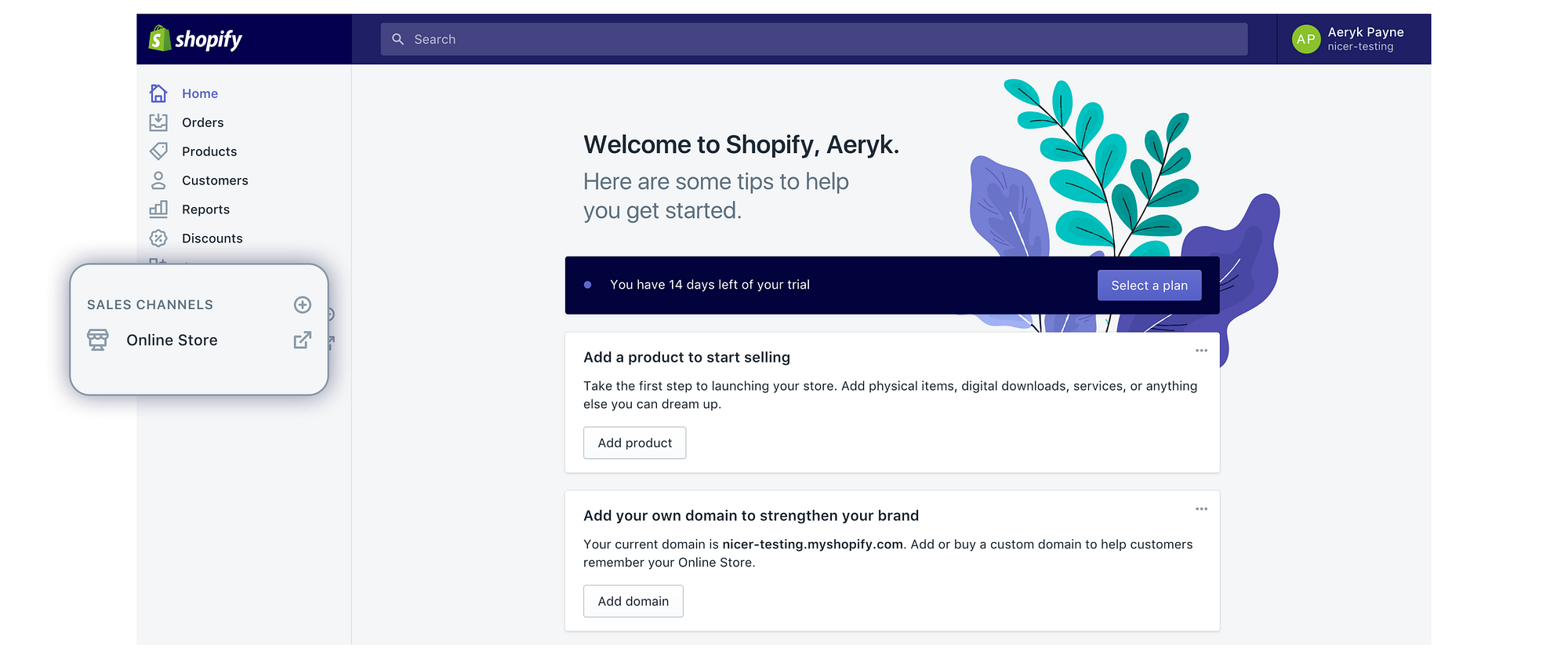
2. Click the Actions dropdown and Select edit HTML/CSS
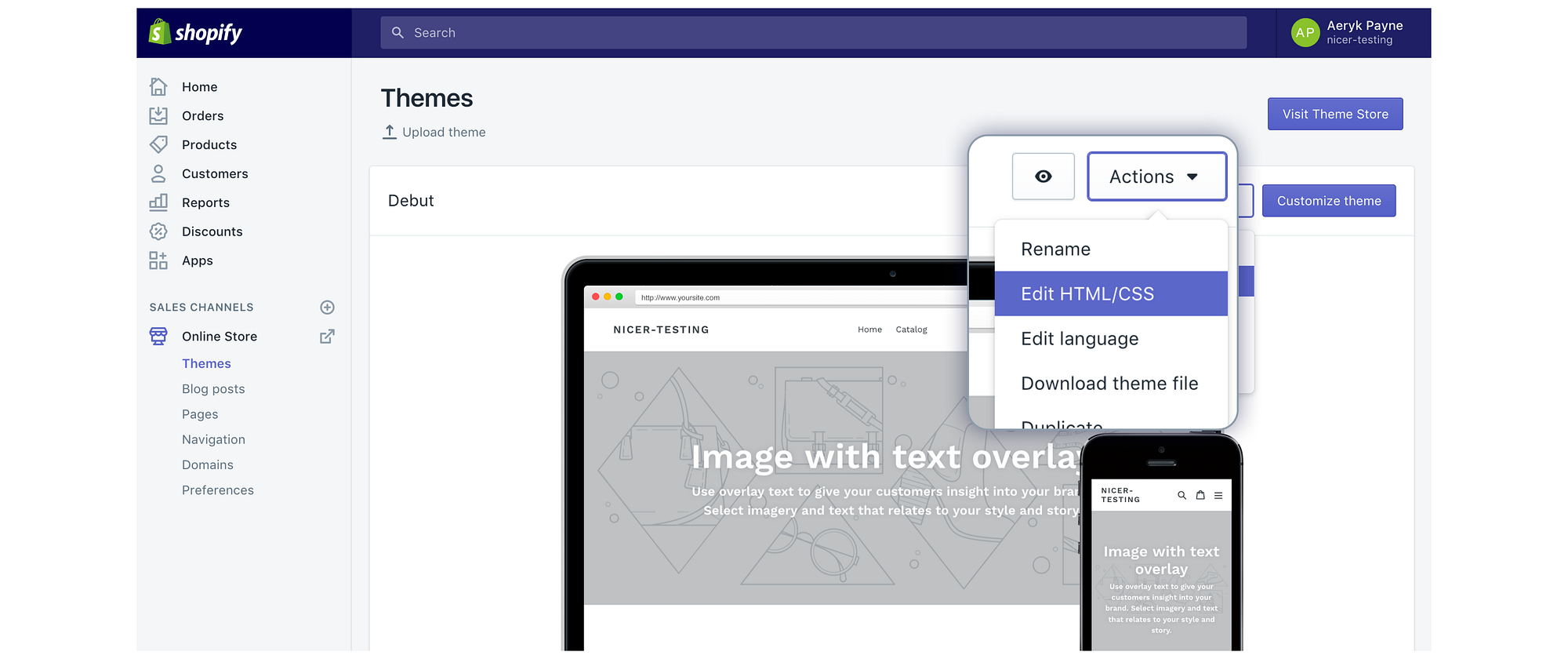
Alright now this may look scary to the non-technical among us but it’s actually really simple.

**3. Look for **theme.liquid under layout.
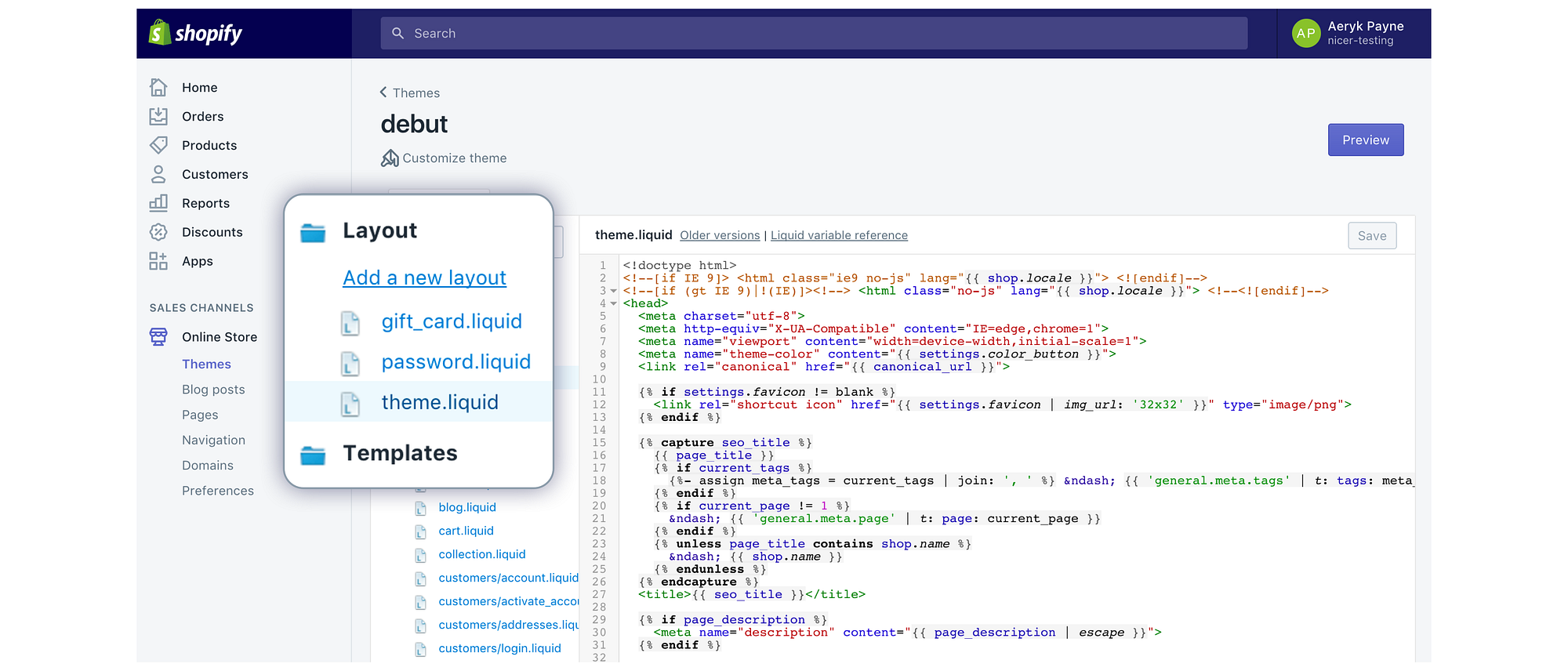
Find the <body> tag, and simply paste in your Smallchat script right below. Save that code and you’re done 🎉.
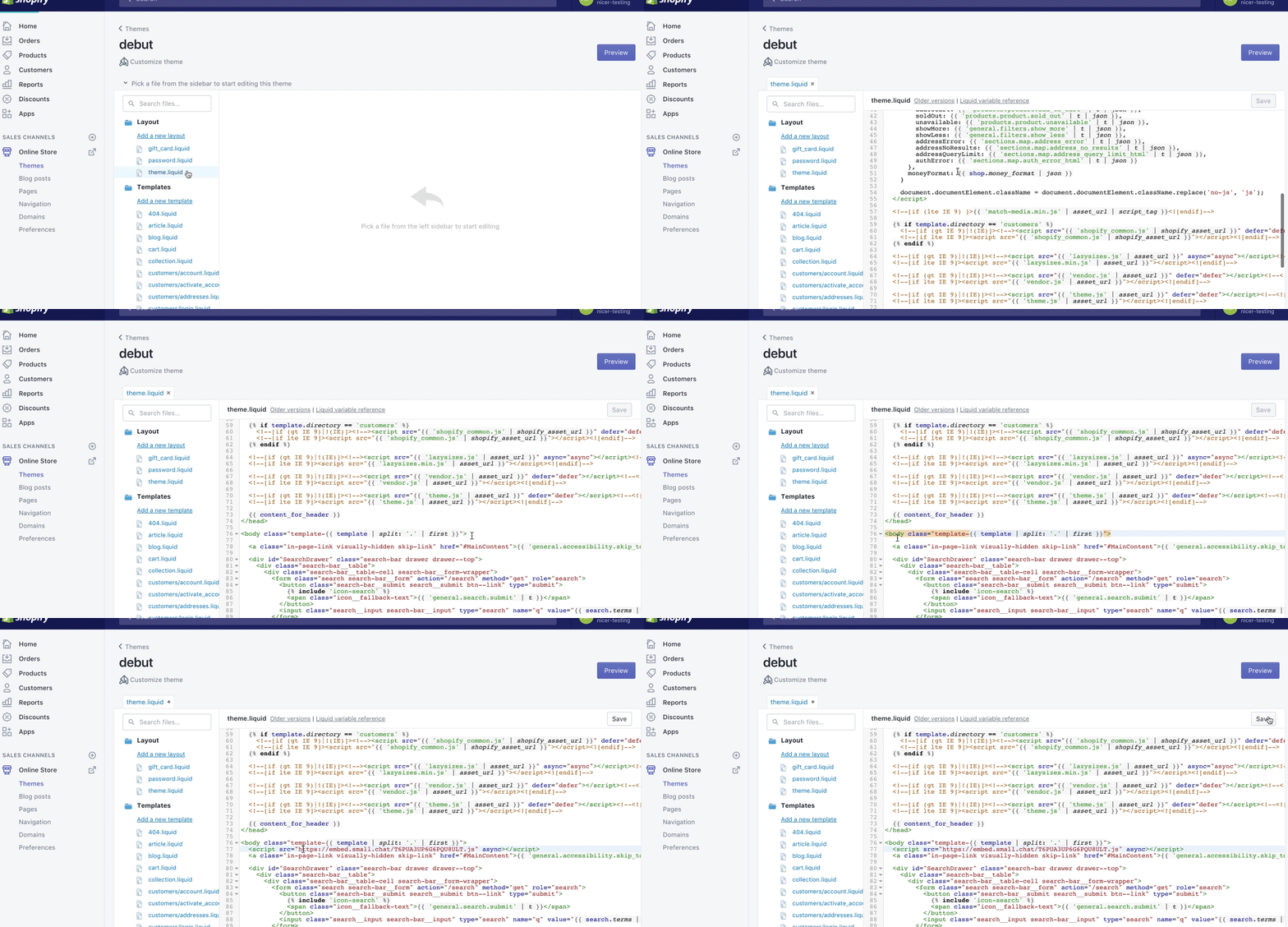
If you want some extra 💅 or just want to feel like a hacker genius you can go over to your assets folder and look for theme.scss.liquid. You can scroll down to bottom of that file and add custom CSS styles to your Smallchat window via the id #Smallchat iframe { your code here }

but always remember to please style responsibly..

And there you go! Your visitors can now interact with you for an even better shopping experience. Hope this helps some of you and best of luck to all our Shopify customers! 🛍

For even better interactions set up Auto Messages to actively reach out to your visitors. We’ll be walking through Auto Messages and all their benefits, including some handy little JS API calls you can use in the near future. ✌

Canonical — this post lives on Medium
Read the original on medium.com

Like what you're seeing? Let's talk.

Available for new work September '26
# Smallchat on Shopify

*Published Aug 22, 2017 · By Nicer Studio*

Originally published on Medium: https://medium.com/stories-by-nicer/smallchat-on-shopify-44925d05d73e

One of the most common questions we get at Smallchat is ‘Will Smallchat work on Shopify?’ The short answer is yes. The long answer, well that’ll take you about 3 minutes to read according to Medium.

Shopify is a great platform for anyone looking to setup an e-commerce site. It’s simple and easy to get started, fully customizable, and makes managing your orders a piece of 🍰. Adding Smallchat to your site helps you turn pageviews into conversations. This allows your visitors a better, richer understanding of you and your product. All of which creates a more personal experience for your customers, which is one of the biggest keys to success in any business venture.

Adding Smallchat to your Shopify Online Store is really simple and takes little to no coding skills. Simply copy the embed script from your Smallchat Dashboard, and head on over to your Shopify Admin Window.\
*(this walkthrough is assuming you’ve added Smallchat to Slack. If you want more info on that check it out&#x20;*[*here*](https://stories.nicer.io/meet-smallchat-d204fc7f7b7)*&#xA0;)*

**1. From your Shopify Admin Window go your Online Store**

![](/articles/smallchat-on-shopify/img-02.png)

**2. Click the Actions dropdown and Select edit HTML/CSS**

![](/articles/smallchat-on-shopify/img-03.png)

Alright now this may look scary to the non-technical among us but it’s actually *really* simple.

**3. Look for&#x20;****theme.liquid under layout.**

![](/articles/smallchat-on-shopify/img-04.png)

Find the \<body> tag, and simply paste in your Smallchat script right below. Save that code and you’re done 🎉.

![](/articles/smallchat-on-shopify/img-05.gif)

If you want some extra 💅 or just want to feel like a hacker genius you can go over to your assets folder and look for theme.scss.liquid. You can scroll down to bottom of that file and add custom CSS styles to your Smallchat window via the id #Smallchat iframe { your code here }

*but always remember to please style responsibly..*

And there you go! Your visitors can now interact with you for an even better shopping experience. Hope this helps some of you and best of luck to all our Shopify customers! 🛍

For even better interactions set up Auto Messages to actively reach out to your visitors. We’ll be walking through Auto Messages and all their benefits, including some handy little JS API calls you can use in the near future. ✌

![](/articles/smallchat-on-shopify/img-06.gif)